AI Agent Architecture: Tools, Frameworks & Workflow Design
Table of Contents
Subscribe To Our Newsletter
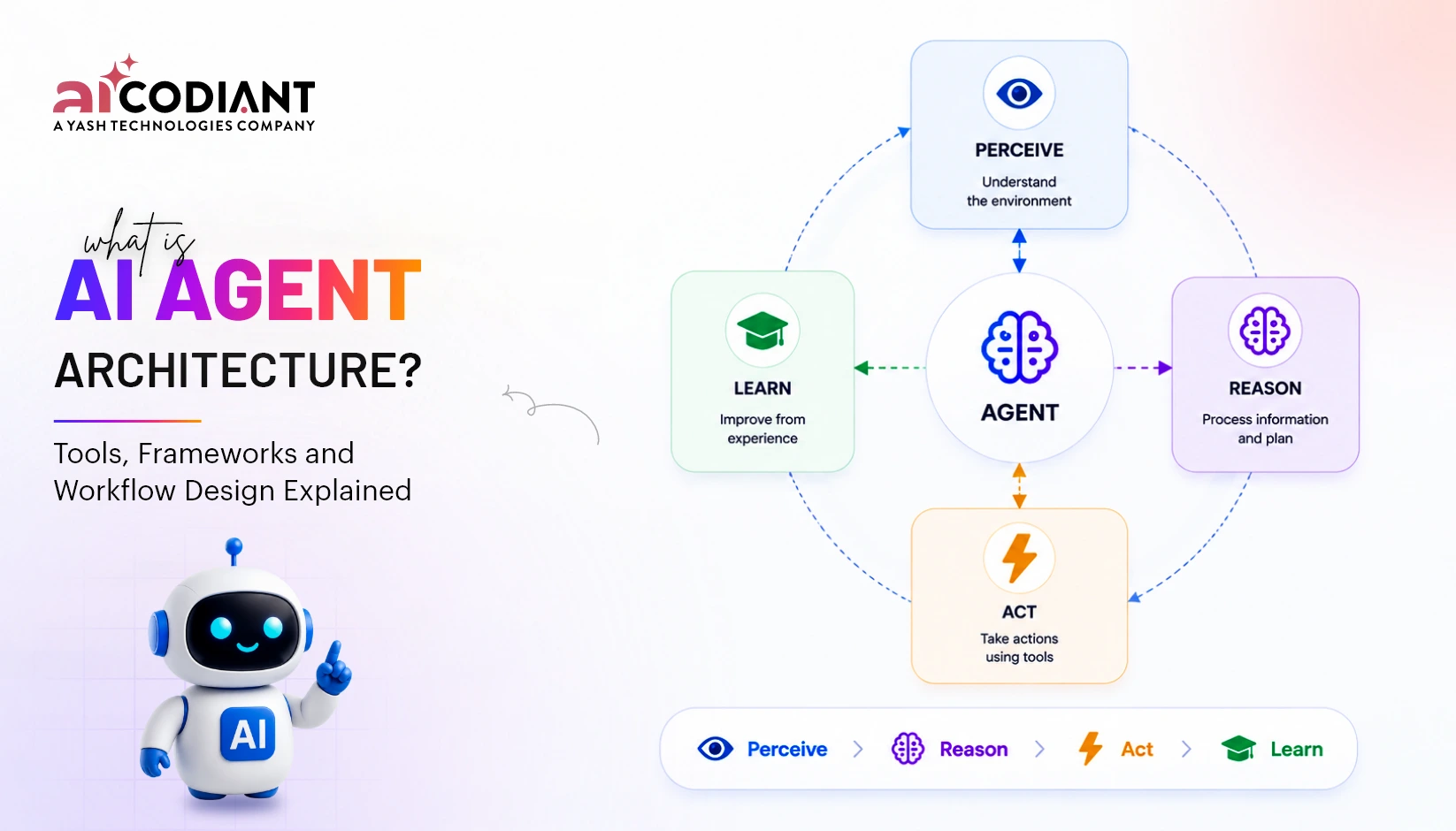
AI agent architecture is the technical structure that enables an AI system to understand goals, make decisions, use external tools, maintain context and complete multi-step tasks. It combines an AI model with memory, orchestration logic, enterprise data, APIs, security controls and monitoring systems.
A well-designed architecture does more than connect a large language model to an application. It defines what an agent can access, how it chooses actions, where human approval is required and how failures are detected. This guide explains the components, frameworks, orchestration tools and workflow patterns involved in production-ready AI agent development solutions.
In a Nutshell
- AI agent architecture connects models, tools, memory and business systems.
- Orchestration controls task order, routing, retries and agent collaboration.
- Framework selection depends on workflow complexity, infrastructure and governance needs.
- Tools allow agents to search, calculate, retrieve data and execute actions.
- Multi-agent systems divide complex work among specialized AI agents.
- Deterministic workflows are safer for regulated or high-impact processes.
- Enterprise deployments require permissions, tracing, evaluation and human oversight.
- Start with one agent before introducing multi-agent complexity.
What Is AI Agent Architecture?
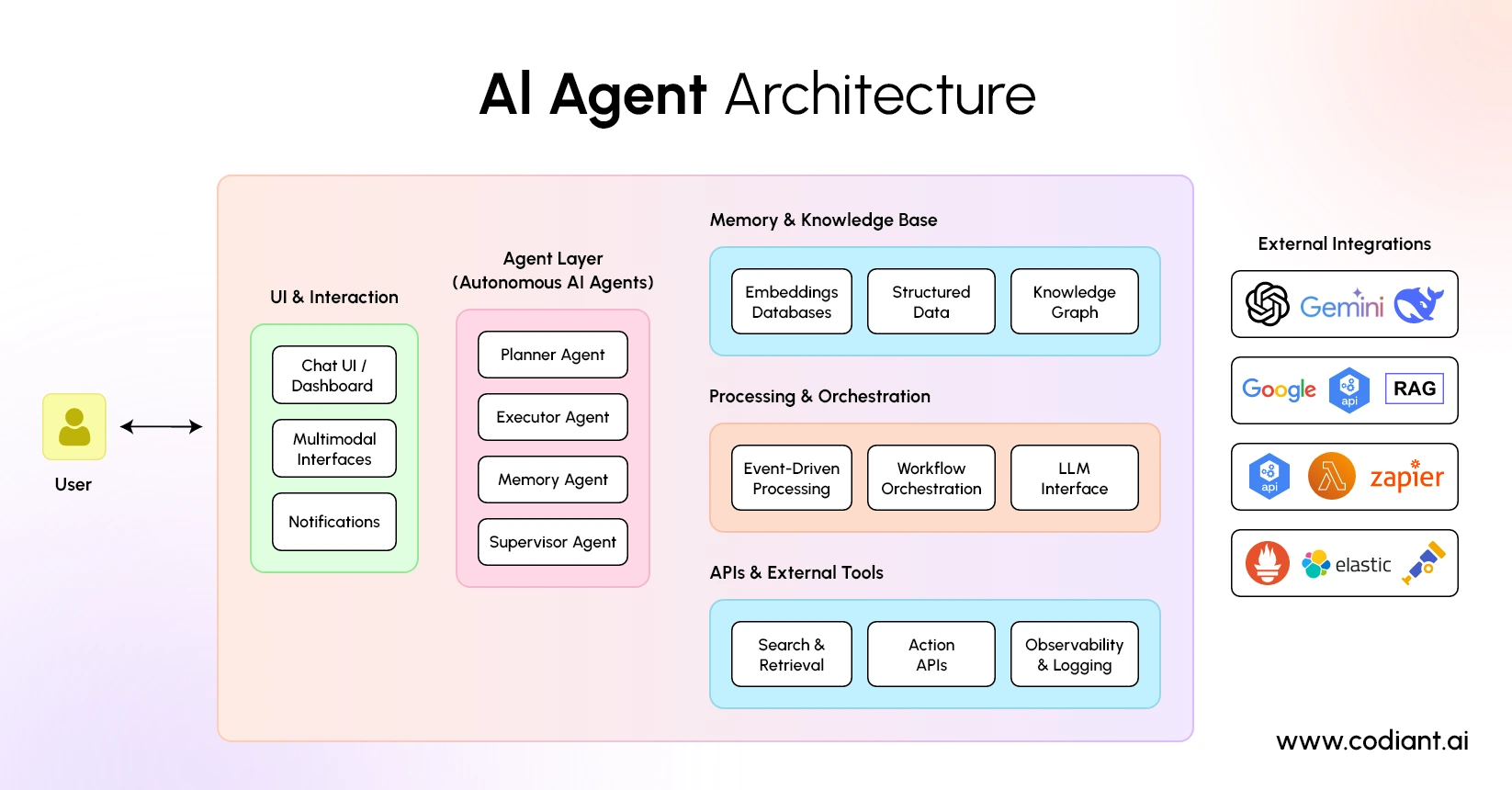
AI agent architecture is the system design that determines how an AI agent receives a goal, interprets context, plans its next action, calls tools, evaluates results and produces an output. Its purpose is to turn a language model into an application that can perform controlled, goal-oriented work.
An AI model alone generates responses from an input. An agentic system adds instructions, state, tools, execution logic and feedback mechanisms around that model. OpenAI’s Agents SDK, for example, defines an agent as a model configured with instructions, tools and optional runtime capabilities such as handoffs, guardrails and structured outputs.
A typical agentic AI architecture contains the following layers:
| Architecture layer | Primary function |
| User or system interface | Receives requests, events or business triggers |
| Agent instruction layer | Defines the agent’s role, goals and operating boundaries |
| Model layer | Interprets context and selects or generates actions |
| Orchestration layer | Controls routing, sequencing, branching and retries |
| Tool layer | Connects the agent to APIs, databases and applications |
| Memory and state layer | Preserves relevant information across workflow steps |
| Knowledge layer | Retrieves approved documents or enterprise information |
| Governance layer | Applies permissions, validation and human approvals |
| Observability layer | Records model calls, tool usage, latency and failures |
These layers do not have to use separate technologies. However, separating their responsibilities makes the system easier to test, secure and scale.
What Are the Key Components of AI Agent Architecture?
The key components are the model, instructions, tools, knowledge, memory, orchestration, guardrails and observability. Each component solves a different operational requirement and should be designed around the task rather than added simply because a framework supports it.
1. AI model
The large language model interprets instructions, reasons over the available context and determines what response or action may be appropriate. It may also choose a tool, create a task plan or transfer work to another agent.
The model should not be treated as the entire system. Its output can vary, so deterministic application logic should handle permissions, financial rules, validation and irreversible actions.
2. Instructions and goals
Instructions define what the agent is responsible for, which decisions it may make and how it should respond under uncertain conditions. Effective instructions include the agent’s role, task boundaries, approved tools, output format and escalation conditions.
3. Tools
Tools allow an agent to act beyond text generation. They may retrieve customer records, search a knowledge base, update a CRM, execute code, calculate a price or create a support ticket.
The OpenAI Agents SDK describes tools as mechanisms that allow agents to fetch data, call APIs, run code and interact with computers. The Model Context Protocol, or MCP, provides a standardized method for exposing external tools and contextual resources to compatible AI applications.
4. Memory and state
State stores information needed during a workflow, such as the current task, completed steps, tool results and approval status. Memory may preserve relevant information between sessions, but it should not store every interaction without retention rules.
5. Knowledge retrieval
A knowledge layer gives agents access to approved documents, policies, product information or database records. Retrieval-augmented generation can supply relevant material to the model before it generates an answer, reducing dependence on the model’s pretraining alone.
6. Guardrails and approvals
Guardrails evaluate inputs, outputs or tool requests against defined rules. Human approval should be added before sensitive actions such as issuing refunds, changing financial records, approving applications or contacting customers.
7. Tracing and evaluation
Observability records how an agent reached an outcome. A useful trace can include model generations, tool calls, handoffs, guardrail results, latency, errors and token usage. OpenAI’s Agents SDK includes tracing for these events so workflows can be inspected during development and production.
How Do AI Agents Execute Workflows?
AI agents execute workflows by receiving a trigger, evaluating the current state, selecting an action, using a tool or another agent and repeating the process until a completion or escalation condition is reached.
A common AI workflow design follows these stages:
- Receive the goal: A user request, scheduled event or system change starts the workflow.
- Collect context: The agent retrieves relevant conversation history, records or documents.
- Select an action: The model or routing logic decides the next permitted step.
- Call a tool: The agent queries a system, performs a calculation or executes an operation.
- Evaluate the result: The workflow checks whether the tool succeeded and whether more work is required.
- Request approval where needed: A person reviews sensitive or low-confidence actions.
- Complete or escalate: The system returns an answer, updates a system or transfers the case.
Not every stage should be decided dynamically by an LLM. Reliable agentic workflow design combines probabilistic model decisions with deterministic rules.
For example, an IT support agent may use AI to classify a problem and select troubleshooting guidance. A conventional rule can still prevent it from resetting administrator credentials without identity verification.
Which Workflow Pattern Should an Agent Use?
The appropriate workflow pattern depends on whether tasks have a fixed sequence, can run independently or require dynamic collaboration.
| Workflow pattern | How it works | Suitable use case |
| Sequential | Steps run in a fixed order | Document intake and approval |
| Parallel | Independent tasks run simultaneously | Researching multiple data sources |
| Conditional | Routing changes according to state or output | Customer-service triage |
| Loop | A step repeats until a condition is met | Draft-review-refinement workflows |
| Handoff | One specialized agent transfers control to another | Support across billing and technical teams |
| Manager-worker | A coordinator assigns tasks to specialists | Complex research or planning |
| Human-in-the-loop | Execution pauses for review or approval | Regulated and high-impact decisions |
Google’s Agent Development Kit provides sequential, parallel and loop workflow agents for explicit execution control. Microsoft Agent Framework documents sequential, concurrent, handoff, group-chat and manager-led orchestration patterns.
The simplest pattern that satisfies the business requirement is usually the safest starting point.
Which Frameworks Are Used to Build AI Agents?
Common AI agent frameworks include LangGraph, OpenAI Agents SDK, Google Agent Development Kit, Microsoft Agent Framework and CrewAI. They overlap in capability but differ in abstraction level, supported languages, orchestration style and deployment ecosystem.
1. LangGraph
LangGraph is a low-level orchestration framework for long-running, stateful agent workflows. It is suited to systems that require explicit graph-based control, persistent state, human intervention or complex branching.
2. OpenAI Agents SDK
The OpenAI Agents SDK supports agents, tools, handoffs, guardrails, sessions, structured outputs and built-in tracing. It is appropriate for applications using OpenAI models that need a relatively lightweight agent runtime rather than an extensive workflow platform.
3. Google Agent Development Kit
Google’s Agent Development Kit, or ADK, supports conversational and non-conversational agents, custom tools, workflow agents, evaluation and multi-agent orchestration. It can be deployed through Google Cloud services or custom infrastructure.
4. Microsoft Agent Framework
Microsoft Agent Framework supports AI agents and graph-based multi-agent workflows in Python and .NET. Microsoft describes it as the successor to AutoGen and Semantic Kernel, combining agent abstractions with state management, middleware, telemetry and explicit workflow control.
5. CrewAI
CrewAI organizes agentic applications around agents, collaborative crews and event-driven flows. Its documented capabilities include tools, memory, knowledge, guardrails and observability.
Framework popularity alone should not determine the choice. Teams should evaluate model compatibility, runtime control, language support, deployment model, licensing, observability and integration requirements.
How Should Businesses Select an AI Agent Framework?
Businesses should select an AI agent framework by matching its capabilities to the workflow, existing technology stack and operational risk. A proof of concept may prioritize development speed, while an enterprise deployment requires durability, permissions, monitoring and maintainability.
Evaluate each option against these questions:
- Does it support the required model providers?
- Can the team define deterministic workflow paths?
- How does it store state and resume interrupted tasks?
- Does it support human approvals?
- Can tools use enterprise authentication?
- Are model calls, handoffs and tool actions traceable?
- Can individual components be tested independently?
- Does it support the company’s deployment environment?
- How actively is the framework maintained?
- Can the application migrate without rewriting all business logic?
A practical approach is to isolate business rules, tool definitions and data-access code from the selected framework. This reduces vendor dependency and makes future migration easier.
What Tools Are Required for AI Agent Development?
AI agent development requires more than a model API. Production systems commonly need orchestration, retrieval, integrations, identity management, storage, evaluation and monitoring tools.
The main tool categories include:
- Model providers: Supply language, reasoning, embedding or multimodal models.
- Agent frameworks: Manage agent definitions, tool use and execution.
- AI orchestration tools: Control workflow state, routing and task coordination.
- Vector or search systems: Retrieve relevant enterprise information.
- API and integration layers: Connect CRMs, ERPs, ticketing tools and databases.
- Identity and secrets management: Protect credentials and enforce permissions.
- Queues and schedulers: Support asynchronous or long-running jobs.
- Observability platforms: Track traces, errors, latency and model behaviour.
- Evaluation systems: Test task completion, factuality and tool-selection accuracy.
- Deployment infrastructure: Hosts APIs, workers, state stores and model connections.
MCP can provide a standard interface through which compatible clients discover contextual resources and executable tools. However, a protocol does not replace application-level authorization, validation or audit controls.
What Is a Multi-Agent Architecture?
A multi-agent architecture is a system in which two or more specialized agents coordinate to complete a larger task. Each agent may have its own instructions, tools, memory and responsibilities, while an orchestration mechanism controls communication and task transfer.
For example, a procurement system could use:
- An intake agent to interpret a purchase request
- A policy agent to check procurement rules
- A vendor agent to compare approved suppliers
- A risk agent to identify exceptions
- A coordinator agent to assemble the result
- A human approver to authorize the purchase
Multi-agent systems can make responsibilities clearer and allow different models or tools to be assigned to different tasks. Google ADK supports composing multiple agents and execution nodes into a multi-agent workflow, particularly where one monolithic agent becomes difficult to maintain or reason about.
However, more agents do not automatically produce better outcomes. They increase communication overhead, latency, token consumption, failure paths and debugging complexity. A single agent with well-defined tools is often sufficient for straightforward workflows.
How Do AI Agents Integrate With Enterprise Systems?
AI agents integrate with enterprise systems through APIs, databases, message queues, webhooks, integration platforms and standardized tool interfaces. The agent should access these systems through controlled service layers rather than receiving unrestricted credentials.
A secure enterprise AI architecture typically applies:
- Role-based access control
- Least-privilege permissions
- OAuth or service-account authentication
- Tool input validation
- Approval gates for high-impact actions
- Encryption in transit and at rest
- Audit logs for every system change
- Data-retention and deletion policies
- Rate limits and execution timeouts
- Sandboxed code execution
For example, a sales agent may read an account record but require approval before changing a contract value. A healthcare agent may summarize approved clinical information but should not receive access to unrelated patient records.
Enterprise integration should therefore be designed around permitted actions, not simply around what an API technically allows.
How Can Businesses Scale AI Agent Workflows?
Businesses can scale AI agent workflows by separating services, persisting state, processing long tasks asynchronously and monitoring model and tool performance. Scaling means maintaining reliability under greater task volume, not merely adding computing resources.
A scalable approach includes:
- Keep APIs and workers stateless where practical.
- Store workflow state in a durable external system.
- Use queues for slow or asynchronous tasks.
- Run independent workflow branches concurrently.
- Cache reusable context and retrieval results.
- Set model, tool and workflow timeouts.
- Add retry rules for temporary failures.
- Route simple tasks to lower-cost models when validated.
- Monitor cost, latency and task-completion rates.
- version prompts, tools and workflow definitions.
Before expanding across departments, evaluate the agent on representative business tasks. Useful measurements include completion accuracy, tool-selection accuracy, escalation rate, processing time, cost per completed task and the percentage of actions requiring correction.
How Should an Agentic Architecture Be Designed?
An effective agent architecture starts with the business process, not the framework. The team should identify the intended outcome, permitted decisions, required data, failure conditions and human responsibilities before selecting models or orchestration tools.
Use this design sequence:
Business goal → task boundaries → workflow pattern → tools and data → model selection → permissions → evaluation → deployment → monitoring
Start with a deterministic workflow and introduce model-driven decisions only where flexibility is valuable. Add multiple agents only when specialization, isolation or independent execution provides a clear operational benefit.
The strongest AI automation frameworks cannot compensate for unclear processes, poor data access or missing governance. Production readiness depends on the complete system surrounding the model.
Conclusion
AI agent architecture provides the operational foundation that turns an AI model into a system capable of completing real business tasks. Its essential elements include instructions, tools, state, knowledge retrieval, orchestration, guardrails and observability.
The right architecture is not necessarily the one with the most agents or the newest framework. It is the simplest design that can complete the workflow reliably, protect enterprise data, explain its actions and involve people at the appropriate decision points.
Build Smarter AI Agents with Architecture Designed for Enterprise Scale
CodiantAI turns complex workflows into secure, scalable agent systems built around your business goals today.
Frequently Asked Questions
The main components are an AI model, instructions, tools, memory, workflow state, knowledge retrieval, orchestration, guardrails and observability. Enterprise systems also require identity controls, approval mechanisms and audit logging.
Frequently considered frameworks include LangGraph, OpenAI Agents SDK, Google Agent Development Kit, Microsoft Agent Framework and CrewAI. The appropriate choice depends on supported languages, model providers, workflow complexity, deployment infrastructure and governance requirements.
AI agents connect with enterprise systems through APIs, tool interfaces, databases, queues and webhooks. These connections should use authenticated service layers, restricted permissions, input validation and complete audit logs.
LLMs interpret requests, reason over context, generate responses and may decide which tool or agent should be used next. Deterministic software should still enforce permissions, validate outputs and control sensitive business actions.
Businesses can scale workflows by using persistent state, asynchronous processing, queues, concurrent execution, caching, model routing and comprehensive monitoring. Workflows should be evaluated for accuracy, latency, cost and failure recovery before being expanded.
Featured Blogs
Read our thoughts and insights on the latest tech and business trends
AI Roadmap: How to Build and Scale AI Across the Enterprise
- September 17, 2026
- Artificial Intelligence
An AI roadmap is a structured plan that connects business priorities with AI use cases, data, technology, governance, people, implementation, and measurable outcomes. For enterprises, it provides the sequence for moving from AI opportunities and... Read more

Top Predictive Analytics Models and Algorithms to Know
- September 11, 2026
- Artificial Intelligence
Predictive analytics models are statistical and machine learning systems that use historical data to forecast future outcomes, such as customer churn, equipment failure, demand spikes, or credit risk. The most widely used categories are regression... Read more

AI Data Analytics: What It Is, Why It Matters, and Business Use Cases
- September 4, 2026
- AI-Powered Data Analytics
AI data analytics uses artificial intelligence to examine data and turn it into useful insights. It helps businesses identify patterns, predict what may happen next, and decide what actions to take. It can analyze numbers,... Read more